
Samples
Two runnable console apps, each a self-contained tour of one side of Hindsight, and a small web page that puts them together into a history screen. None needs a database of your own - each starts and tears down its own disposable PostgreSQL 17 container, so dotnet run is the whole setup.
| demonstrates | writer | |
|---|---|---|
ProductCatalogSample | AsOf, AllVersions, History<T>, delete tombstones | HistoryWriter.Interceptor (the default) |
TaskTrackerSample | who changed a row and why, and what a raw ExecuteUpdate leaves behind | HistoryWriter.Trigger |
HistoryViewerSample | a read-only history screen: timeline, Diff between versions, AsOf at any instant | HistoryWriter.Trigger |
The tutorial walks through the third sample project, InsuranceSample, step by step against an ASP.NET Core API; these are shorter and meant to just be run.
Product catalog
dotnet run --project samples/ProductCatalogSampleA product's price changes twice after it's created. AsOf answers what it looked like at an earlier point in time, with no extra code at the call site:
// What did this product look like right after launch, before the sale?
var atLaunch = await db.Products.AsOf(priceChangedAt).SingleAsync(p => p.Id == widget.Id);
Console.WriteLine($"AsOf(right after launch): {atLaunch.Name} was {Money(atLaunch.Price)}, stock {atLaunch.StockQuantity}.");
History<Product>() shows the same timeline with its validity windows and what changed:
Console.WriteLine();
Console.WriteLine("History<Product>() — every version with its validity window:");
await foreach (var v in db.History<Product>().Where(v => v.Entity.Id == widget.Id).AsAsyncEnumerable())
{
    var to = v.IsCurrent ? "now" : v.ValidTo.ToString("O");
    Console.WriteLine($"  [{v.ValidFrom:O} .. {to}]  {v.Operation,-6}  {Money(v.Entity.Price),8}");
}
The product is then deleted. It's gone from products - but History<Product>() still has the tombstone: when it was deleted and what it looked like right before.
Task tracker
dotnet run --project samples/TaskTrackerSampleTwo simulated users move a work item through its statuses. Each change is wrapped in DbContext.WithReason(...), so the audit trail carries who made it and why:
using (CurrentUser.Act("bob"))
using (db.WithReason("Picked it up"))
{
    item.Status = WorkItemStatus.InProgress;
    await db.SaveChangesAsync();
}
Console.WriteLine("bob moved it to InProgress.");

using (CurrentUser.Act("alice"))
using (db.WithReason("Reviewed and merged"))
{
    item.Status = WorkItemStatus.Done;
    await db.SaveChangesAsync();
}
Console.WriteLine("alice marked it Done.");
History<WorkItem>() reads that trail back:
Console.WriteLine();
Console.WriteLine("History<WorkItem>() — who changed it, and why:");
await foreach (var v in db.History<WorkItem>().Where(v => v.Entity.Id == item.Id).AsAsyncEnumerable())
{
    Console.WriteLine($"  {v.Entity.Status,-11} by {v.ChangedByName ?? "(unknown)",-6} — {v.Reason}");
}
Then a plain ExecuteUpdateAsync moves a batch of items directly in SQL - no SaveChanges, no interceptor anywhere in the call stack. HistoryWriter.Trigger catches it anyway, with NULL in every change-context column, since there's no SaveChanges call for a provider to attach one to (see Choosing a history writer):
// A couple more items, created without going through the change-context machinery above.
db.WorkItems.AddRange(
    new WorkItem { Title = "Update the README", Status = WorkItemStatus.Todo, UpdatedAt = DateTimeOffset.UtcNow },
    new WorkItem { Title = "Triage issues", Status = WorkItemStatus.Todo, UpdatedAt = DateTimeOffset.UtcNow });
await db.SaveChangesAsync();

// ExecuteUpdate bypasses SaveChanges (and the interceptor) entirely - Trigger mode still catches it.
var closed = await db.WorkItems
    .Where(w => w.Status == WorkItemStatus.Todo)
    .ExecuteUpdateAsync(s => s.SetProperty(w => w.Status, WorkItemStatus.Cancelled));
Console.WriteLine();
Console.WriteLine($"ExecuteUpdate cancelled {closed} Todo item(s) directly in SQL - no SaveChanges call.");
History viewer
dotnet run --project samples/HistoryViewerSampleA read-only web page over the product catalog, showing what an audit or "history" screen built on Hindsight looks like. It seeds three products with several versions each (price changes, a rename, a delete, three users, a reason on every change), then opens http://localhost:5080 in your browser. It uses HistoryWriter.Trigger, so the timeline also shows a bulk ExecuteUpdate.
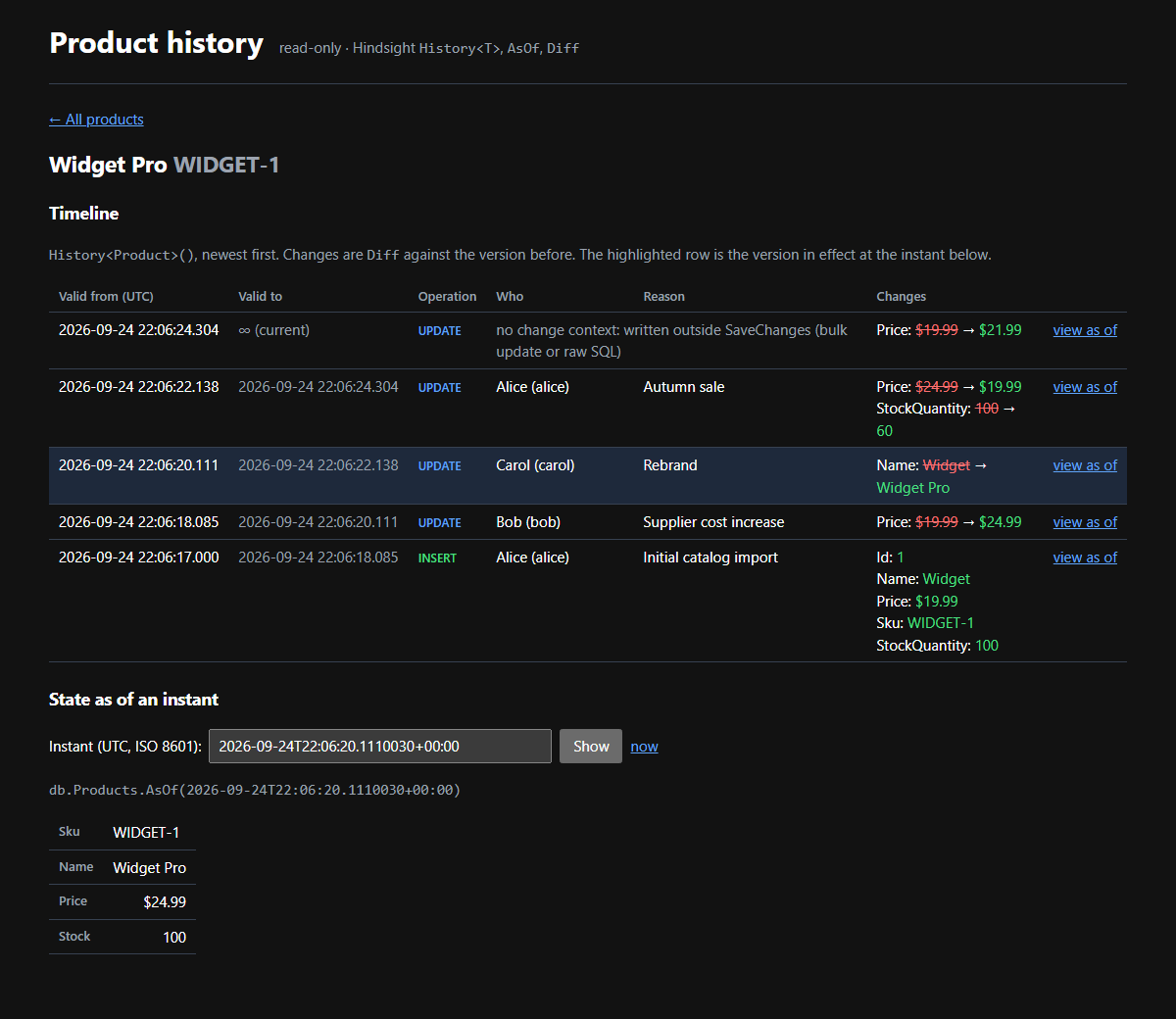
The product list comes from History<Product>(), so deleted products stay on it. The newest row per product is its latest state, or its delete tombstone:
// Every product that ever existed, deleted ones included: a history screen that hides deleted rows
// can't answer "what happened to GADGET-1?". History<T>() returns newest first, so the first row
// per product is its latest state, or its delete tombstone.
// Grouped in memory: fine for a sample; a real screen would page this.
public async Task<IReadOnlyList<ProductSummary>> ListProductsAsync(CancellationToken ct = default)
{
    var history = await db.History<Product>().ToListAsync(ct);
    return history
        .GroupBy(v => v.Entity.Id)
        .Select(g => new ProductSummary(g.First(), g.Count(v => v.Operation != VersionOperation.Delete)))
        .OrderBy(s => s.Latest.Entity.Sku, StringComparer.Ordinal)
        .ToList();
}
A product's timeline is its History<Product>() rows with who, when and why, and each version diffed against the one before it. The delete tombstone has no state to compare, so the loop skips it:
// The audit view: every history row of one product, newest first, delete tombstone included, with
// who, when and why. Each row is diffed against the state version before it.
public async Task<IReadOnlyList<TimelineEntry>> TimelineAsync(int productId, CancellationToken ct = default)
{
    var versions = await db.History<Product>()
        .Where(v => v.Entity.Id == productId)
        .ToListAsync(ct);

    var timeline = new List<TimelineEntry>(versions.Count);
    Version<Product>? older = null;
    foreach (var version in Enumerable.Reverse(versions)) // oldest first, to diff forwards
    {
        // A delete tombstone repeats the last state's values, so Diff rejects it: the delete is read
        // from Operation. `older == null` diffs the insert against nothing.
        var changes = version.Operation == VersionOperation.Delete ? [] : db.Diff(older, version);
        timeline.Add(new TimelineEntry(version, changes));
        if (version.Operation != VersionOperation.Delete)
        {
            older = version;
        }
    }

    timeline.Reverse(); // newest first again, for display
    return timeline;
}
The row that ExecuteUpdate wrote has no change context: no SaveChanges ran, so there was nothing to attach one to, and the page says so instead of showing an empty name. Picking an instant shows the product as it was then, with AsOf:
// The product exactly as it was at `at`, or null if it didn't exist then (not created yet, or
// already deleted).
public Task<Product?> AsOfAsync(int productId, DateTimeOffset at, CancellationToken ct = default) =>
    db.Products.AsOf(at).SingleOrDefaultAsync(p => p.Id == productId, ct);
The page has no edit or restore button: history is read-only.
Next steps
- Concepts: versions, periods and tombstones, in five minutes.
- Choosing a history writer: Interceptor vs. Trigger, in depth.
- Change context: store the user, the correlation id and the reason with every version.